
Using TimescaleDB as an Operational Datastore for the Unified Namespace
A practical guide to using TimescaleDB as an operational datastore for the Unified Namespace, preserving metrics, events, states, and operational context for analytics and AI.

The Unified Namespace (UNS) provides the real-time operational data backbone in an industrial data architecture. Applications can subscribe to live equipment measurements, dashboards can respond to state changes, production systems can consume order and batch events, and AI agents can observe changes across the operation as they happen.
But many industrial use cases also depend on historical data. Advanced analytics, traceability, AI model training, and AI-assisted decision-making all require access to what happened before, not just what is happening now.
A mature industrial data architecture therefore typically includes a persistent operational datastore alongside the real-time UNS.
In this article, I will walk through one way to build that operational datastore from UNS data using TimescaleDB and Node-RED.
Architecture overview
The implementation follows a simple pattern: operational systems publish normalized and contextualized data into the Unified Namespace, Node-RED subscribes to the relevant message classes, and TimescaleDB provides the persistent operational datastore.
The UNS used in this example already contains several types of operational information, including equipment and metric definitions, live measurements, equipment states, production events, batch records, control recipes, production responses, and maintenance events.
The UNS follows a consistent topic namespace and data model, enabling predictable subscriptions, schema validation, and reliable persistence of operational data into the datastore.
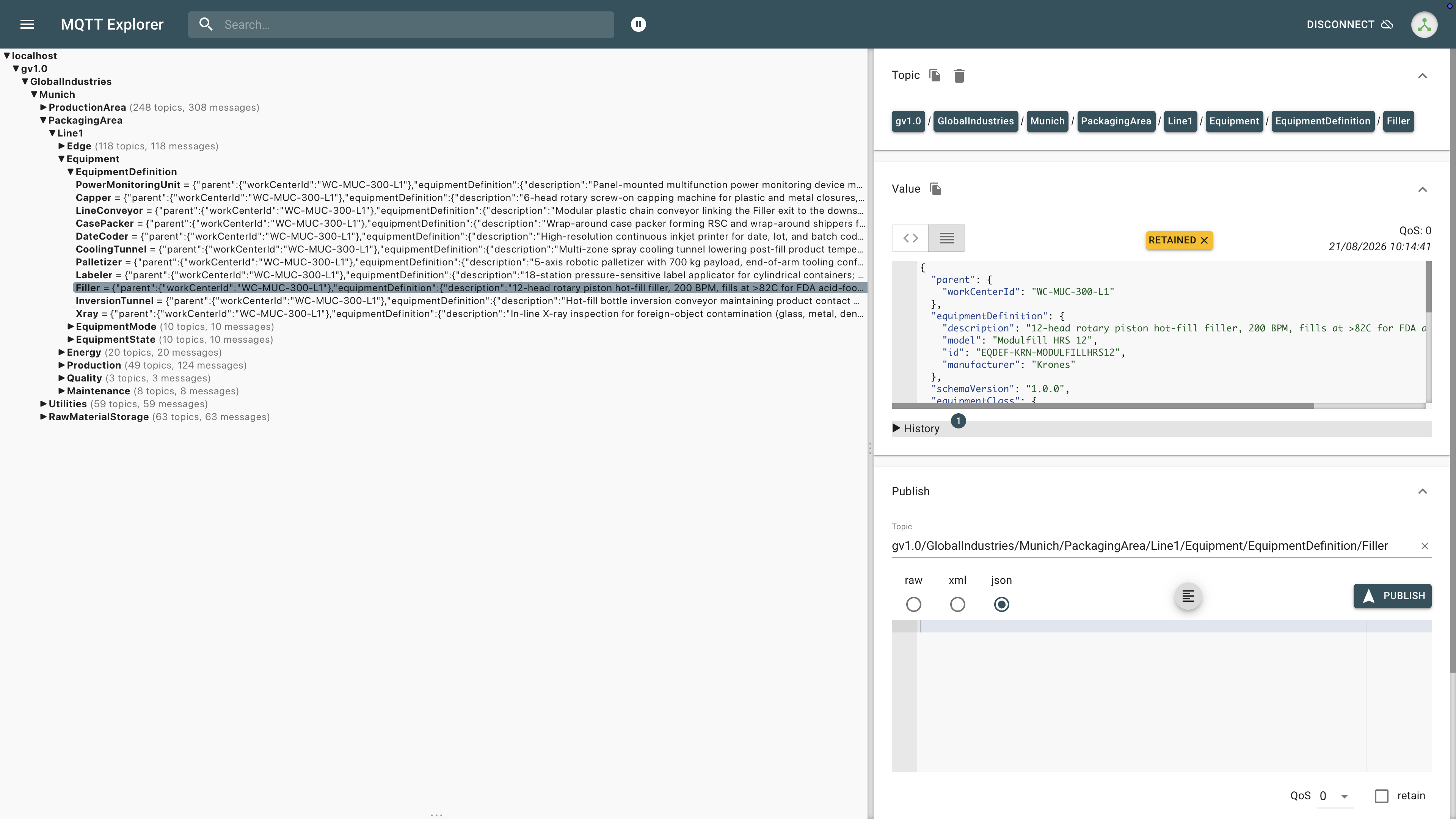
Rather than subscribing to individual topics, Node-RED uses MQTT wildcard subscriptions to consume groups of related messages and route them into the appropriate database structures.
The data pipeline looks like this.
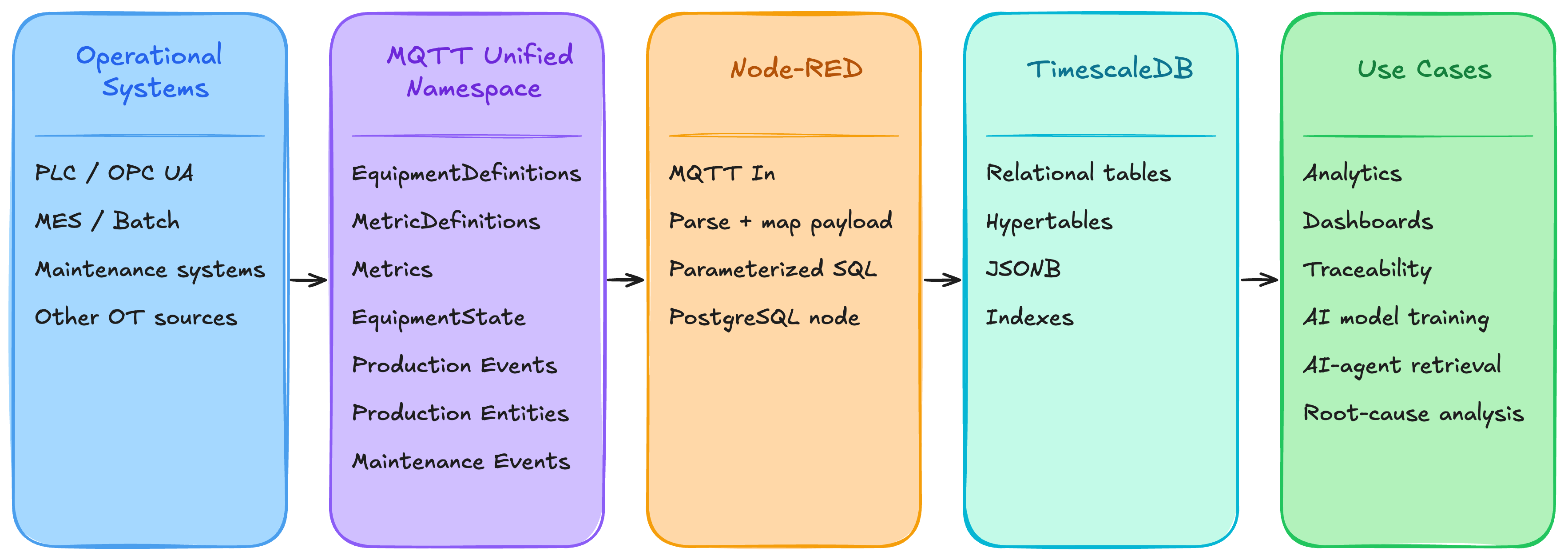
The important part, however, is not simply getting MQTT messages into TimescaleDB. It is deciding how different types of operational information should be stored.
Measurements are time series. Events are immutable records of things that happened. Definitions represent relatively stable master data. Other messages describe the latest known state of an operational entity. Treating all of these as the same kind of data quickly leads to a database that is difficult to query and maintain.
So the real design challenge is deciding how the structure of the Unified Namespace should translate into the structure of the operational datastore.
Start by separating time-series data from entity data
A useful starting point is to separate data that represents a sequence of observations over time from data that represents the latest known definition or state of an operational entity.
In this implementation, the datastore is broadly divided into two groups:
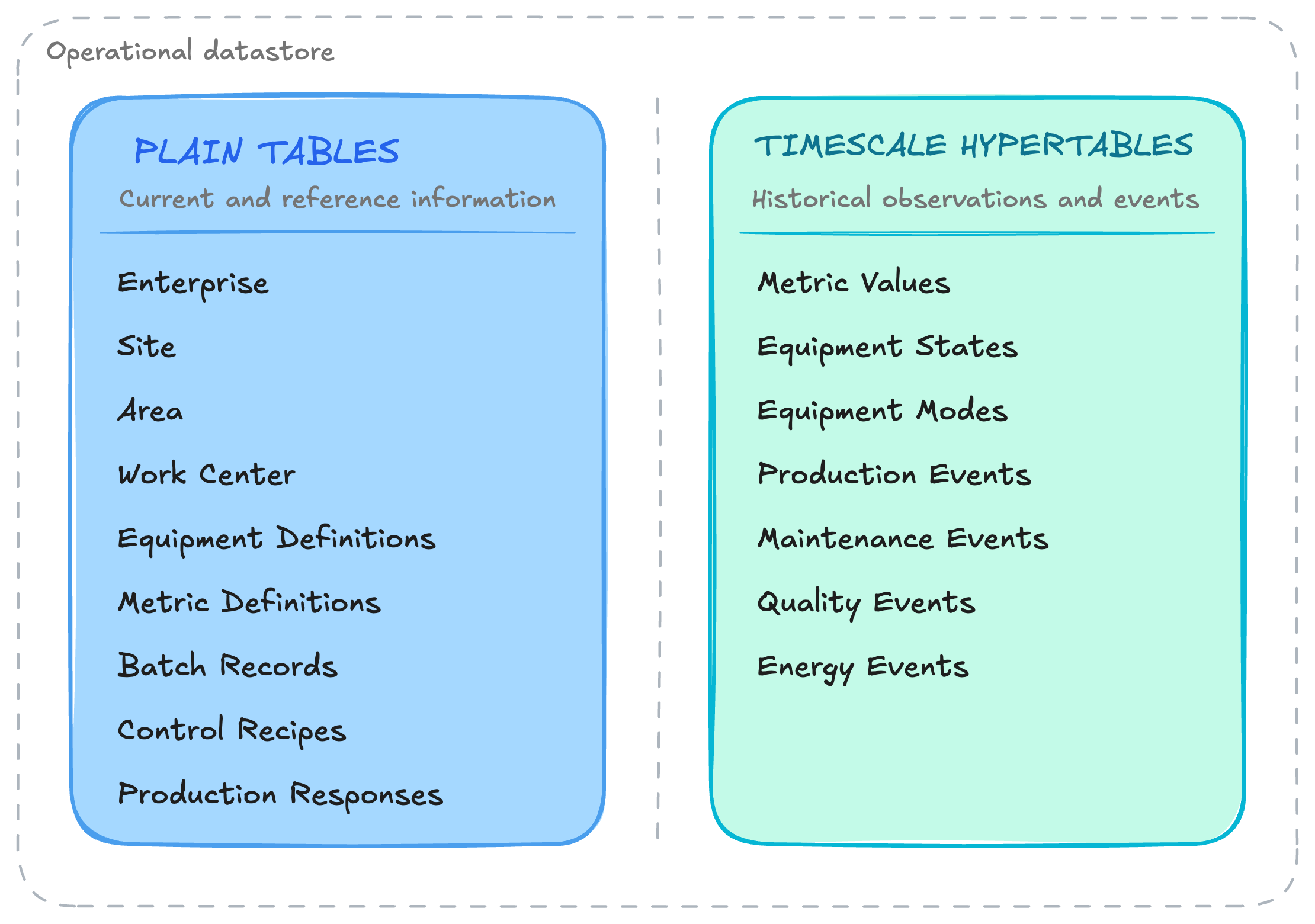
The separation determines how each type of data should be persisted.
Consider an EquipmentDefinition. If the definition for a filler is published again because its metadata has changed, I generally want the datastore to reflect the latest known definition of that asset. I do not need every publication to become another row in a large time-series table.
A process measurement is different. If a pressure value changes from 12.1, 12.3, 12.5, 12.2, each observation is part of the operational history. Replacing the previous value would destroy the very information the datastore is intended to preserve.
For entity and reference data, the database typically inserts a new record when the entity is first seen and updates that record when a newer definition arrives. For time-series measurements and events, each observation is appended with its timestamp so that the history remains available for later analysis.
This simple distinction forms the foundation of the datastore design. From there, each UNS message class can be mapped to the persistence pattern that best reflects what the data actually represents.
Model the plant topology as relational reference data
The plant hierarchy provides the contextual backbone of the datastore:
Enterprise/Site/Area/Work Center/Equipment
These entities are modeled as conventional PostgreSQL tables.
enterprise
site
area
work_center
equipment_definitions
Each uses a stable identifier, for example:
GLOBAL-IND
SITE-MUC
AREA-MUC-200
WC-MUC-200-L1
EQ-MUC-HG401
Foreign keys preserve the relationships between hierarchy levels. An equipment record points to its work center, the work center points to its area, and so on.
This gives high-volume historical data a stable relational context without forcing the complete Enterprise → Site → Area → Work Center hierarchy into every time-series row.
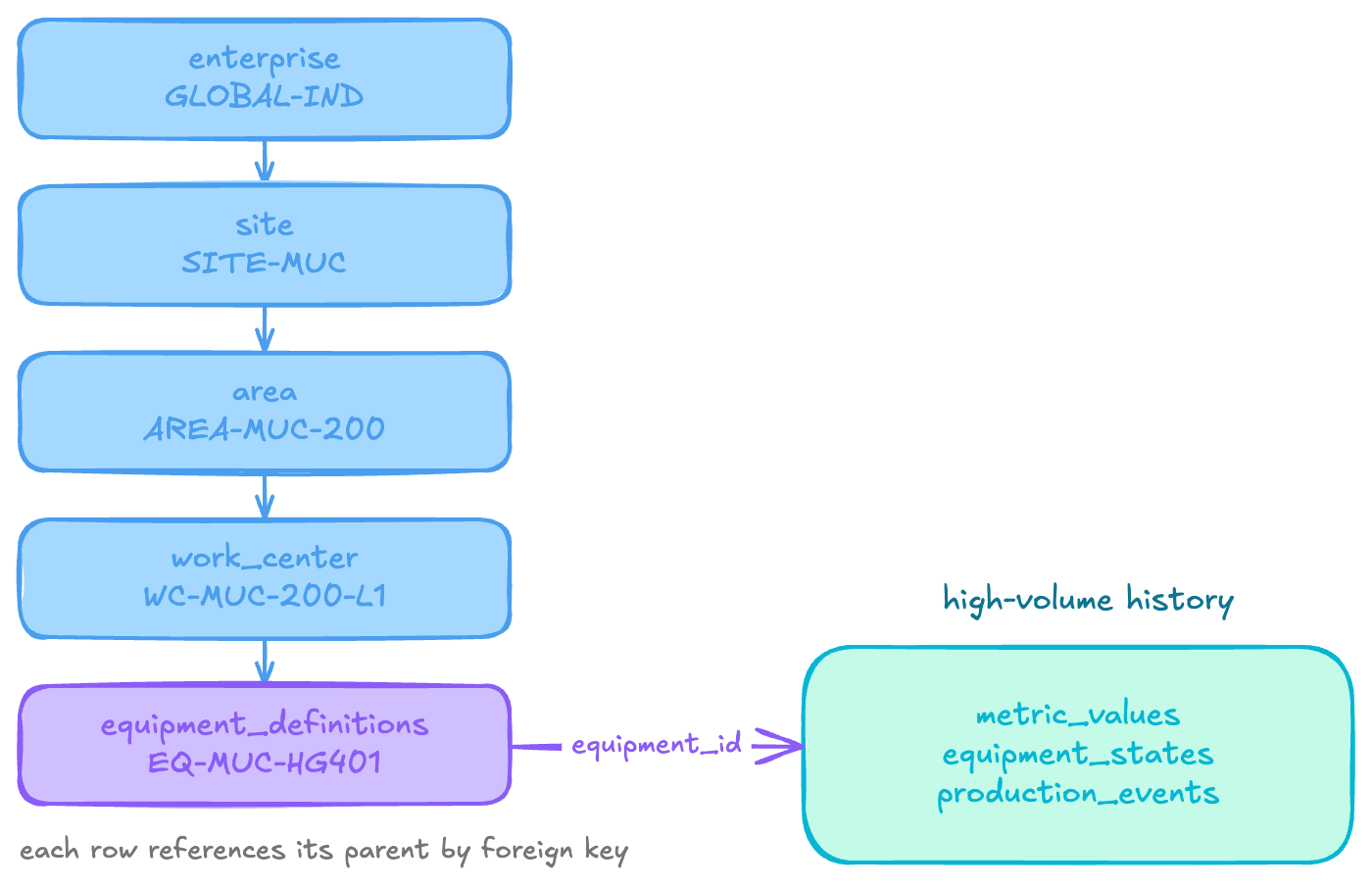
A query such as “Give me every pressure measurement for equipment belonging to Packaging Line 1” can first resolve the relevant equipment identifiers and then retrieve the associated measurements.
The equipment identifier becomes the bridge between historical observations and the broader operational model.
Persist EquipmentDefinitions as current master data
Node-RED subscribes to:
gv1.0/+/+/+/+/Equipment/EquipmentDefinition/#
The + wildcards allow one consumer to receive EquipmentDefinition messages across multiple enterprises, sites, areas, and work centers without creating a subscription for every asset. Below is an example equipment definition payload from the UNS.
{
"schemaVersion": "1.0.0",
"equipment": {
"id": "EQ-MUC-FL501",
"assetTag": "FL-501",
"name": "Rotary Piston Filler FL-501",
"lifecycleStatus": "commissioned",
"serialNumber": "KRN-MF12-18-0912",
"installationDate": "2018-11-05"
},
"equipmentClass": { "id": "EQCLASS-FILLER", "name": "Filler" },
"equipmentDefinition": {
"id": "EQDEF-KRN-MODULFILLHRS12",
"manufacturer": "Krones",
"model": "Modulfill HRS 12",
"description": "12-head rotary piston hot-fill filler, 200 BPM, fills at >82C for FDA acid-food pasteurization"
},
"parent": { "workCenterId": "WC-MUC-300-L1" },
"source": {
"origin": "BatchPlantSimulator_OPCUA",
"uri": "opc.tcp://localhost:26543/BatchPlantServer/Area500_Filling/Filler_FL501",
"gateway": "Ignition-Gateway-001",
"originSystemId": 1015
},
"quality": "Good",
"timestamp": 1779277854779
}
Each message is mapped into equipment_definitions, with first-class columns for each property.
The Node-RED function extracts these values from the payload and then writes the record using:
INSERT ... ON CONFLICT (equipment_id) DO UPDATE
If EQ-MUC-HG401 already exists and a newer definition arrives, its current master record is updated rather than duplicated. Historical observations for that asset remain separate in the time-series layer.
Store MetricDefinitions as a metric catalogue
MetricDefinitions need a slightly different pattern because measurement metadata can vary considerably between metrics.
The flow subscribes to:
gv1.0/+/+/+/+/+/MetricDefinitions/#
A message may describe a metric such as:
equipmentId = EQ-MUC-HG401
name        = homogenizerSecondStagePressure
datatype
description
classification
engineering
operationalLimits
source
Rather than building a very wide relational table for every possible property, the datastore keeps one row per equipment instance:
metric_definitions
equipment_id
metrics JSONB
schema_version
The metrics document acts as a catalogue keyed by metric name.
{
 "homogenizerSecondStagePressure": {
   "datatype": "Float",
   "engineering": {
     "engUnit": "bar",
     "engLow": 0,
     "engHigh": 20
   },
   "source": {}
 }
}
When a new definition arrives, Node-RED builds the metric object and merges it into the existing JSONB catalogue.
This keeps stable relational identity explicit through equipment_id while allowing variable measurement metadata to remain flexible. Downstream applications can then discover what measurements exist for an asset, what they mean, and how they should be interpreted.
Store measurements in a TimescaleDB hypertable
MetricValues are where TimescaleDB becomes particularly useful because they accumulate continuously and at high volume.
Node-RED subscribes to gv1.0/+/+/+/+/+/Metrics/#, and maps each observation into a compact metric_values table.
time
equipment_id
metric_name
value
quality
schema_version
The key design principle is to separate the observation from its broader context.
Instead of repeatedly storing:
Munich
Production Area
Line 1
Homogenizer
GEA
Model XYZ
Second Stage Pressure
bar
12.4
the time-series row can remain small:
2026-08-10T12:31:00Z
EQ-MUC-HG401
homogenizerSecondStagePressure
12.4
Good
1.0.0
The richer context is resolved through equipment_definitions and metric_definitions. This avoids repeating relatively static metadata millions of times.
metric_values is converted into a TimescaleDB hypertable partitioned on time, with indexes around:
equipment_id
metric_name
time DESC
That aligns with common queries such as “Give me the latest value,” “Give me the last hour,” or “Give me this measurement during Batch 4711.”
During ingestion, Node-RED converts the source timestamp into a PostgreSQL timestamp and writes the observation. A uniqueness rule based on equipment, metric, and timestamp can prevent accidental duplicates while still allowing a point to be corrected when necessary.
Historize state transitions as events
Equipment state shows why persistence should follow the semantics of the message.
The flow subscribes to gv1.0/+/+/+/+/Equipment/EquipmentState/#.
An EquipmentState message represents a transition such as:
Equipment EQ-MUC-FL501
entered Starved
at 14:17:03
Each transition is written to an equipment_states hypertable with fields such as:
event_time
equipment_id
event_id
state_code
state_name
note
schema_version
source_origin
source_uri
quality
published_at
A state is a sequence of discrete transitions.
Running → Starved → Running → Blocked
There is little value in storing Starved every second while the asset remains in that condition. What matters is when it entered the state and when it left it.
By ordering transitions for an equipment instance, SQL window functions such as LEAD(event_time) can derive state start, state end, dwell time, and next state. That makes questions such as “How long was this filler starved?” straightforward without storing redundant sampled state values.
Store operational events as append-only history
The same principle applies to production events.
Node-RED subscribes to gv1.0/+/+/+/+/Production/Events/# and maps the following event messages into the venet table production_events.
ProcessOrderCreated
WorkOrderReceived
WorkOrderActivated
BatchStarted
BatchCompleted
OperatorAction
Below is an example of an event message payload.
{
  "eventType": "BatchPhaseCompleted",
  "eventId": "EVT-PHASE-DONE-26154-0022",
  "eventVersion": "2.0",
  "timestamp": "2026-06-03T06:50:00+02:00",
  "source": {
    "origin": "BatchPlantSimulator_OPCUA",
    "uri": "opc.tcp://localhost:26543/BatchPlantServer",
    "gateway": "Ignition-Gateway-MUC-Line1",
    "originSystemId": 1015
  },
  "correlationId": "batch-BR-MUC-LINE1-260603-0419",
  "data": {
    "batchRecordId": "BR-MUC-LINE1-260603-0419",
    "producedBatch": "B-20260603-001",
    "workOrderId": "WO-MUC-26154-0007",
    "controlRecipeNumber": "CR-1000234567-01",
    "processOrderNumber": "1000234567",
    "operationNumber": "0020",
    "operationName": "Cook",
    "phaseNumber": "0022",
    "phaseName": "HeatToTarget",
    "unitName": "KT-301",
    "isa95Context": {
      "enterprise": "GlobalIndustries",
      "site": "Munich",
      "area": "ProductionArea",
      "processCell": "Line1"
    },
    "startTime": "2026-06-03T06:42:00+02:00",
    "endTime": "2026-06-03T06:50:00+02:00",
    "durationSec": 480,
    "expectedDurationSec": 480,
    "durationDeviationPct": 0,
    "status": "Complete",
    "completionReason": "SetpointReached",
    "reportParameters": {
      "actualTemperature": 90.1,
      "rampRate": 2.4,
      "steamConsumedKg": 24.6
    },
    "exitSnapshot": {
      "kettleTempC": 90.1,
      "kettleVolumeL": 1850,
      "agitationRpm": 50,
      "jacketPressureBar": 3.2
    },
    "deviations": [],
    "alarmsFired": [],
    "operatorInterventions": [],
    "phaseSignature": {
      "signedBy": "system",
      "signedAt": "2026-06-03T06:50:00+02:00",
      "reason": "Auto-sign on SetpointReached"
    }
  }
}
These are historical facts. A new WorkOrderActivated event should not update the previous one; both belong in history.
The event table therefore uses an append-oriented structure containing fields such as:
event_time
event_id
event_type
event_version
correlation_id

process_order_number
work_order_id
control_recipe_number
batch_record_id
produced_batch
material_number

status
site
area
process_cell

source_origin
source_uri
source_gateway
source_system_id

data JSONB
The schema deliberately combines relational columns with JSONB. Fields used frequently for filtering and joins, such as event_type, work_order_id, batch_record_id, material_number, and site, become first-class columns. Event-specific details such as operator, reason, phase, parameters, or deviations remain in data JSONB.
This avoids two extremes. Turning every possible event attribute into a column would make the table expand continuously as new event types appear. Storing the entire payload only as JSON would make common queries unnecessarily awkward. The hybrid model provides both stability and flexibility.
A consistent event envelope in the UNS makes this much easier. The ingestion function can always extract shared fields such as:
eventType
eventId
eventVersion
timestamp
correlationId
source
and promote useful identifiers from data into relational columns while retaining the complete event-specific object as JSONB.
That means WorkOrderActivated, BatchStarted, OperatorAction, and future event types can use the same ingestion pattern as long as they follow the shared event contract.
The same approach extends to other domains through tables such as:
maintenance_events
quality_events
energy_events
Preserving identifiers such as work_order_id, batch_record_id, process_order_number, control_recipe_number, and correlation_id also allows history to be reconstructed around business context rather than timestamps alone.
Instead of only asking “What happened between 13:00 and 14:00?”, you can ask “What happened during Work Order WO-123?” or “Show me every event associated with Batch B-20260810-001.”
Persist operational objects as current snapshots
Not every production object belongs in an event table. Some messages represent the latest snapshot of an operational entity.
The flow therefore subscribes separately to:
.../Production/BatchRecord/#
.../Production/ControlRecipe
.../Production/ProductionResponse/#
and persists them into conventional PostgreSQL tables:
batch_records
control_recipes
production_responses
using upserts.
A BatchRecord, for example, may contain the batch ID, work order, process order, control recipe, product, customer, equipment, current state, current operation, current phase, consumed materials, deviations, and reporting information.
The datastore needs a convenient current representation of that batch, so batch_record_id becomes the primary key and each new publication updates the existing row. Richer detail can still be retained in data JSONB.
These entity tables answer questions such as:
What is the latest state of this BatchRecord?
Which material does this ControlRecipe produce?
How complete is this ProductionResponse?
The event hypertables answer a different question:
How did it get here?
A BatchRecord might currently show:
state = Running
currentOperation = Mixing
currentPhase = Agitation
while the event history explains the path to that state:
09:02 WorkOrderActivated
09:04 BatchStarted
09:07 PhaseStarted: ChargeWater
09:16 PhaseCompleted: ChargeWater
09:17 PhaseStarted: Mixing
09:28 OperatorAction
Combined with process metrics and equipment-state history, the datastore preserves both the current operational snapshot and the historical context behind it.
Use wildcard subscriptions to scale ingestion
The Node-RED layer does not need a subscription for every sensor, asset, or production object. It subscribes to predictable classes of information:
Equipment Definitions
gv1.0/+/+/+/+/Equipment/EquipmentDefinition/#

Metrics
gv1.0/+/+/+/+/+/Metrics/#

Metric Definitions
gv1.0/+/+/+/+/+/MetricDefinitions/#

Equipment State
gv1.0/+/+/+/+/Equipment/EquipmentState/#

Production Events
gv1.0/+/+/+/+/Production/Events/#

Maintenance Events
gv1.0/+/+/+/+/Maintenance/Events/#
If another homogenizer is commissioned tomorrow and publishes beneath .../Metrics/..., the existing subscription already receives its data. If a new production event appears beneath .../Production/Events/..., it can enter the same generic event pipeline provided it conforms to the expected schema.
This is one of the practical benefits of treating the UNS as a predictable API for operational information. The operational datastore becomes asset-agnostic at the subscription layer while remaining schema-aware at the ingestion layer.
What this operational datastore makes possible
Persisting metrics, definitions, states, events, and operational entities together creates a much richer historical foundation than a traditional tag historian.
Instead of only asking:
What was Pressure_101 at 14:03?
you can begin asking:
What was Homogenizer HG401's second-stage pressure during Work Order WO-123, while Batch B-4711 was running, before the equipment entered a faulted state?
The data remains stored according to its natural shape, but shared identities allow the different histories to be combined.
Contextual historical analytics
Process measurements can be aligned with work orders, batches, equipment states, operator actions, and quality events. That makes it possible to distinguish pressure during normal operation from pressure before starvation, after an operator intervention, during a particular batch, or around a quality failure.
Historical analysis becomes contextual analysis rather than a search through disconnected tag values.
Traceability and operational reconstruction
The same model can reconstruct the history of a batch, work order, or material.
Identifiers such as batch_record_id, produced_batch, work_order_id, and control_recipe_number can bring together the BatchRecord, production events, equipment states, operator actions, and process measurements.
A reconstructed batch timeline might look like:
Batch B-4711

09:00 Control recipe downloaded
09:03 Work order activated
09:05 Batch started
09:12 Material consumed
09:18 Equipment entered Starved
09:22 Operator intervention
09:24 Equipment returned Running
09:47 Quality inspection completed
10:02 Batch completed
Metrics can then be aligned with that timeline. This is useful for electronic batch records, quality investigations, root-cause analysis, genealogy, auditability, and process optimization.
AI and machine-learning datasets
Machine-learning models need historical data, but volume alone is not enough. The data becomes more reusable when it retains operational identity and meaning.
Instead of opaque names such as TAG_001, the datastore can expose:
equipment_id = EQ-MUC-HG401
metric_name  = homogenizerSecondStagePressure
The associated MetricDefinition can describe the engineering unit, expected range, source, classification, and meaning of the measurement. Production and event history can provide labels such as Running, Starved, Faulted, Good batch, or Rejected batch.
That creates a stronger starting point for feature engineering and model training.
Historical context for AI agents
AI agents benefit from the same foundation.
An agent might receive a live UNS event: Filler FL501 entered Starved.
The UNS tells the agent what just changed. Deciding what it means may require history.
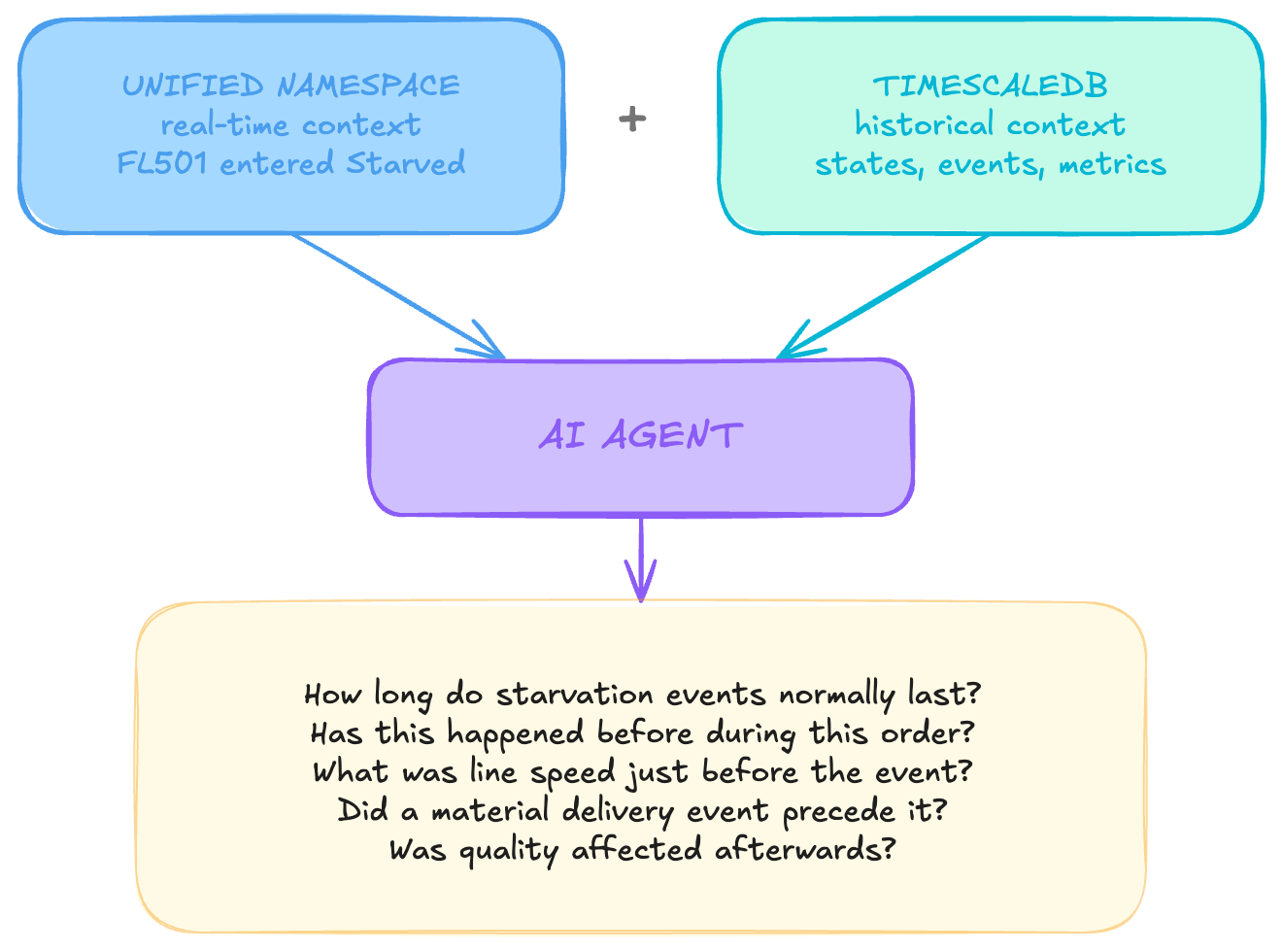
Those questions belong in the operational datastore.
The UNS tells the agent what is happening now. TimescaleDB helps it understand what happened before, what normally follows, and what else was happening at the time.
Conclusion
Using TimescaleDB as an operational datastore for the Unified Namespace is not simply a matter of persisting MQTT messages. The value comes from preserving the semantics already established in the UNS and choosing a storage pattern that matches each type of information.
Reference data and current operational entities belong in relational tables and can be maintained through upserts. Measurements belong in time-series hypertables. State changes and operational events belong in append-oriented history. Shared identifiers and a consistent event envelope then allow those records to be connected across equipment, batches, orders, and processes.
The result is a datastore that complements the real-time UNS rather than trying to replace it. The UNS provides the current operational picture; TimescaleDB preserves the history behind that picture. Together, they provide a practical foundation for contextual analytics, traceability, machine learning, and AI agents that need both current conditions and historical evidence.
Get the Next Guide
New architecture guides, implementation tutorials and use-case blueprints, delivered as they’re published.
More guides
All guides →

The leading IIoT & AI educational platform for digital manufacturing teams