
How to Model Events for a Unified Namespace
A practical guide to modelling operational events in a Unified Namespace for workflows, traceability, analytics, and AI.

In the previous article, we looked at several example data models for the Unified Namespace, including Metric, EquipmentDefinition, EquipmentState, Status, KPI, and Event.
Events deserve a closer look because they introduce a different way of thinking about industrial data.
Most industrial data models describe what is true now. A Batch might be represented by its current state, phase, product, and associated Work Order. Event modelling adds another dimension by preserving the meaningful occurrences that explain how that current condition came about.
Instead of knowing only that a Batch is currently HELD, we might also know that its pasteurization phase started, a temperature deviation was detected, an alarm fired, and an operator subsequently held the phase.
In simple terms, current state answers what is true now, while event history helps explain what happened and how we got here.
This article focuses on how to model events published to the Unified Namespace so they can support real-time workflows, historical persistence, traceability, analytics, and Agentic AI.
Start with the Operational Lifecycle
One of the most effective ways to identify useful events is to start with the lifecycle of the operational entities themselves. Consider a Process Order. In a typical execution flow, it may move through states such as Created, Released, Completed, and Closed. Those transitions naturally suggest events such as ProcessOrderCreated, ProcessOrderReleased, ProcessOrderCompleted, and ProcessOrderClosed.
These are not arbitrary messages generated by an ERP or MES. They represent meaningful moments in the lifecycle of the Process Order.
The same approach can be applied to other operational entities.
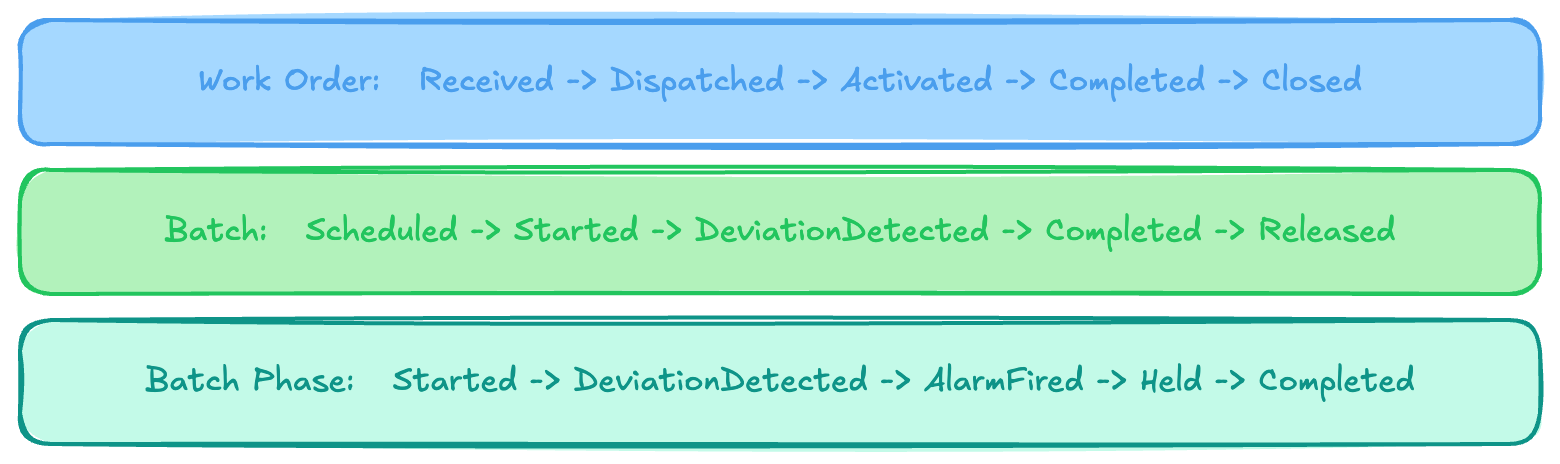
Thinking in terms of operational lifecycles keeps the event model centred on what is actually happening in the manufacturing process rather than on the implementation details of the systems involved.
Model Meaningful Occurrences, Not Every Change
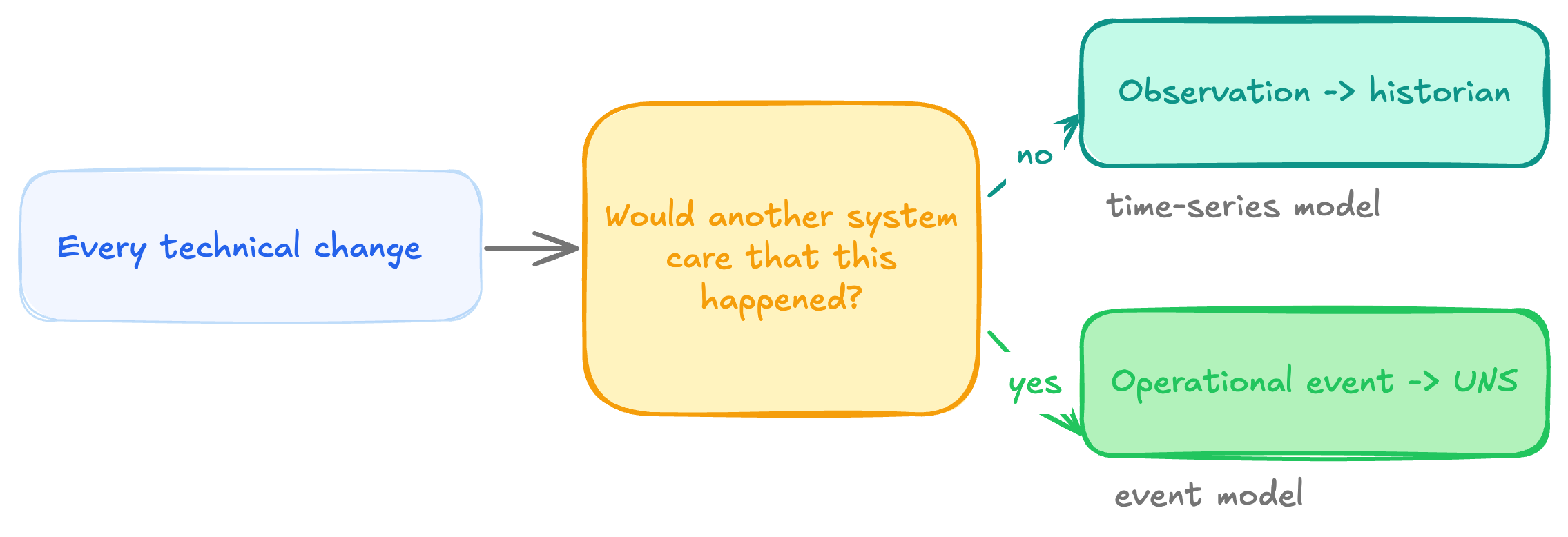
At a technical level, almost any change can be described as an event. A PLC bit changes, a sensor value moves, a database record is updated, or a message arrives. That does not mean each of those changes should become an operational event in the UNS.
Consider a sequence of temperature readings: 87.9, 87.8, 87.6, 87.7
Those are observations and belong naturally in a time-series model.
Now compare them with BatchPhaseDeviationDetected. That event represents something more meaningful: the process has moved outside its expected operating envelope.
The same applies to BatchStarted, WorkOrderActivated, or ProcessOrderReleased. Their significance comes from the operational occurrence they represent, not simply because an underlying property changed.
This also influences how events should be named. BatchHeld communicates something meaningful across systems, while ExecutionStateCodeChanged describes an implementation detail. Similarly, ProcessOrderReleased is more portable than ERPStatusUpdated.
A useful test is whether another application would care that the occurrence happened without needing to understand the internal workings of the source system. If the answer is yes, it is a good candidate for an operational event.
Make Each Event Represent One Operational Fact
A useful event should represent one meaningful occurrence, although that does not mean its payload has to be small.
BatchReleased, for example, describes a single business fact: Quality released a particular Batch. Understanding and proving that fact may require laboratory results, release authority, genealogy information, an electronic signature, regulatory status, and inventory disposition. The payload can therefore be rich while the event itself remains semantically focused.
This becomes especially valuable when events are viewed as a sequence.
Suppose the current state of a Batch Phase is simply:
Phase = HELD
That tells us where execution currently stands, but little about why. The preceding event sequence provides the missing context:
06:50:00  BatchPhaseStarted
06:50:30  BatchPhaseDeviationDetected
06:50:32  BatchPhaseAlarmFired
06:50:45  BatchPhaseHeld
Now we know that the phase started, the process moved outside its expected range, an alarm fired, and an operator responded by holding execution. The state tells us the outcome; the events preserve the operational journey.
Give Events a Consistent Envelope
Once the useful events have been identified, their top-level structure should remain predictable. In the model used throughout these examples, a Production event follows a common envelope:
{
  "eventType": "BatchPhaseCompleted",
  "eventId": "EVT-PHASE-DONE-26154-0022",
  "eventVersion": "2.0",
  "timestamp": "2026-06-03T06:50:00+02:00",
  "source": {
    "origin": "BatchPlantSimulator_OPCUA",
    "uri": "opc.tcp://localhost:26543/BatchPlantServer",
    "gateway": "Ignition-Gateway-MUC-Line1",
    "originSystemId": 1015
  },
  "correlationId": "batch-BR-MUC-LINE1-260603-0419",
  "data": {
    "batchRecordId": "BR-MUC-LINE1-260603-0419",
    "producedBatch": "B-20260603-001",
    "workOrderId": "WO-MUC-26154-0007",
    "controlRecipeNumber": "CR-1000234567-01",
    "processOrderNumber": "1000234567",
    "operationNumber": "0020",
    "operationName": "Cook",
    "phaseNumber": "0022",
    "phaseName": "HeatToTarget",
    "unitName": "KT-301",
    "isa95Context": {
      "enterprise": "GlobalIndustries",
      "site": "Munich",
      "area": "ProductionArea",
      "processCell": "Line1"
    },
    "startTime": "2026-06-03T06:42:00+02:00",
    "endTime": "2026-06-03T06:50:00+02:00",
    "durationSec": 480,
    "expectedDurationSec": 480,
    "durationDeviationPct": 0,
    "status": "Complete",
    "completionReason": "SetpointReached",
    "reportParameters": {
      "actualTemperature": 90.1,
      "rampRate": 2.4,
      "steamConsumedKg": 24.6
    },
    "exitSnapshot": {
      "kettleTempC": 90.1,
      "kettleVolumeL": 1850,
      "agitationRpm": 50,
      "jacketPressureBar": 3.2
    },
    "deviations": [],
    "alarmsFired": [],
    "operatorInterventions": [],
    "phaseSignature": {
      "signedBy": "system",
      "signedAt": "2026-06-03T06:50:00+02:00",
      "reason": "Auto-sign on SetpointReached"
    }
  }
}
The event-specific information belongs inside data, while the envelope provides the information that is useful across event types: what happened, which occurrence this is, when it happened, which contract version applies, which system asserted it, and which wider execution it belongs to.
This consistency matters because many consumers interact with events before they care about the domain-specific details. A persistence service may store every event, an event router may inspect eventType, a governance service may validate the envelope, and an analytics platform may group events using correlationId.
The principle is simple: standardize the mechanics of the event while allowing the operational content to specialize.
Preserve Identity and Correlation
Manufacturing events rarely exist in isolation. A BatchPhaseHeld event may relate to a Batch, Work Order, Process Order, Control Recipe, Phase, and physical unit. If those objects use stable identifiers, the event can later be connected to the relevant information.
A phase event, for example, might identify:
batchRecordId    = BR-MUC-LINE1-260603-0419
operationNumber  = 0020
operationName    = Cook
phaseNumber      = 0023
phaseName        = PasteurizationHold
unitName         = KT-301
These identifiers allow consumers to connect the occurrence to the wider execution context, which may span Process Order, Work Order, Batch, Operation, and Phase.
Correlation IDs serve a related but slightly different purpose. Rather than identifying an individual object, they provide a convenient way to group events belonging to the same broader execution. A collection of Batch events might share a Batch correlation ID, for example, while Work Order events use the Work Order as their correlation context.
This becomes particularly important after events have been persisted, because consumers can no longer rely on the original MQTT topic alone to reconstruct all of the surrounding context.
Capture Context at the Moment It Matters
Events are also useful places to preserve selected process context at important operational boundaries.
A BatchPhaseStarted event might capture an entry snapshot containing kettle temperature, agitation speed, steam-valve position, and jacket pressure. A deviation event can record the actual values that caused a rule to fire, while a hold event may preserve the process condition at the moment an operator intervened.
The objective is not to copy the entire process image into every event. Continuous numerical history still belongs in the historian. Event payloads should instead capture the values that are directly relevant to understanding the occurrence.
If a deviation occurred because temperature fell below an expected minimum, including the actual temperature, expected range, severity, and relevant process context makes the event understandable on its own. If an analyst later needs the preceding thirty minutes of high-resolution temperature and valve-position data, that can still be retrieved from the historian.
Represent Important Relationships Between Events
Events belonging to the same Batch or Work Order are not necessarily directly related to one another. Sometimes, however, the relationship between two specific occurrences matters enough to preserve explicitly.
For example, a BatchPhaseDeviationDetected event may reference the corresponding Batch-level deviation. A BatchPhaseAlarmFired event can reference the deviation that preceded it, and a subsequent BatchPhaseHeld event can reference the alarm that triggered the operator response.
That produces a chain such as: BatchPhaseDeviationDetected → BatchPhaseAlarmFired → BatchPhaseHeld
This is much more informative than relying entirely on timestamps and expecting downstream applications to infer that the events are connected.
It is also useful to distinguish this from correlation. A correlation ID tells us that several events belong to the same execution. An event reference tells us that this particular occurrence is directly related to that particular occurrence.
Over time, those relationships can form an event graph that gives analytics applications and AI agents a much stronger structure for investigation. The sequence alone does not prove causality, but explicit relationships provide a more reliable scaffold than timestamp proximity.
Preserve Provenance Across System Boundaries
A manufacturing lifecycle often spans multiple systems. A Process Order may originate in ERP, move into MES, execute through a Batch Management or control system, generate alarms from an alarm server, involve operator actions through an HMI, and eventually be released through a Quality system.
A simplified narrative might look like:
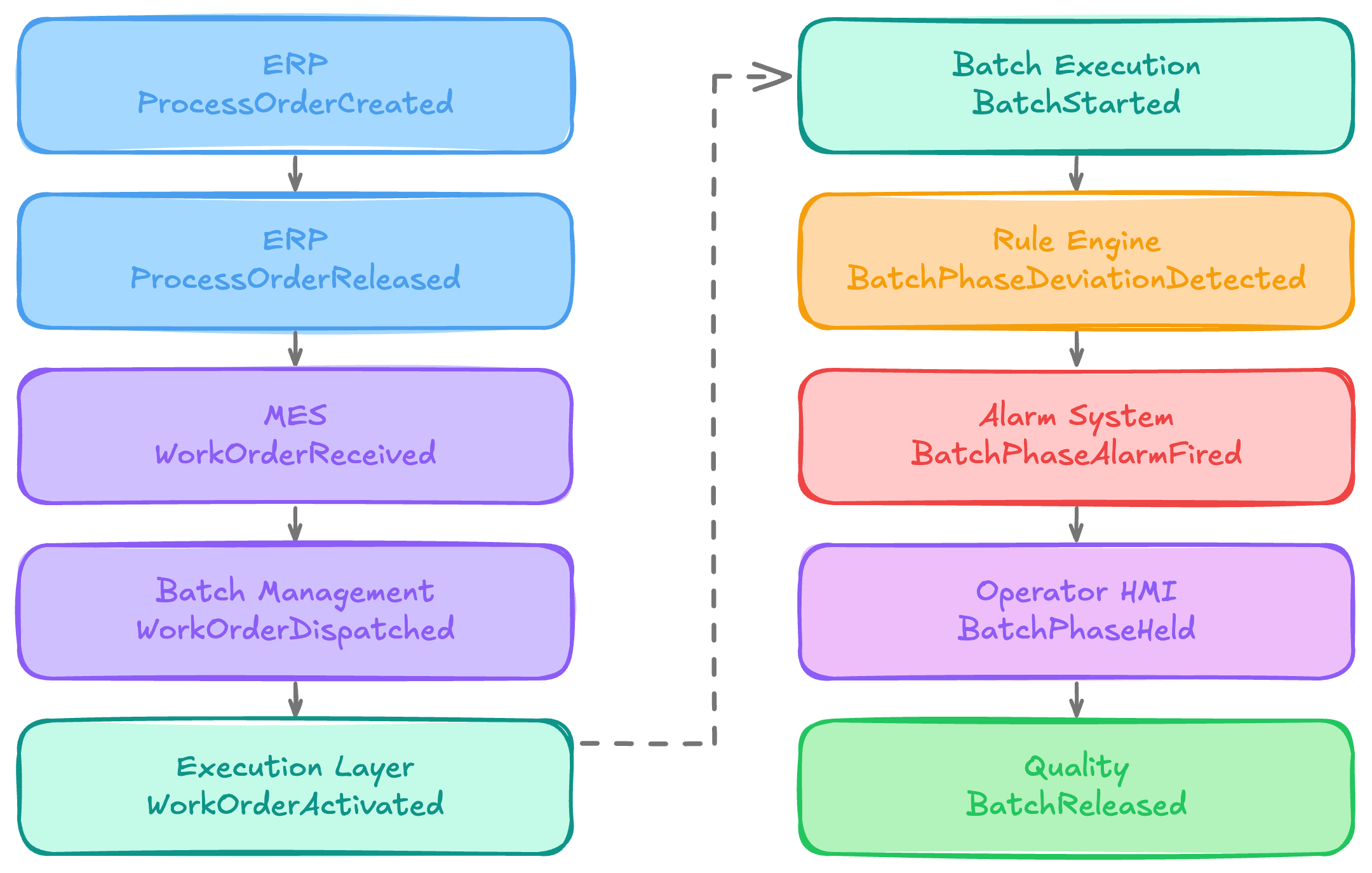
This is why provenance matters in the event model. Each event is effectively an assertion that a particular system says an occurrence happened at a particular time.
Preserving the source allows consumers to understand where the information originated, which becomes important for auditability, reconciliation, troubleshooting, and AI systems that may need to reason about the reliability or authority of different sources.
Human actions deserve similar context. An event such as BatchPhaseHeld can record who performed the action, why it was performed, what triggered the decision, and whether an electronic signature was provided. That turns a simple state change into useful operational evidence.
Let State and Event History Coexist
Event modelling does not mean every consumer should reconstruct current state by replaying historical events.
A dashboard that wants to know which Batch is currently running needs an efficient representation of what is true now. The UNS can provide that through State or Status while also providing an integration point for preserving the event history that explains how the operation arrived there.
In simple terms, state changes, while events accumulate.
The same logic helps separate events from commands. HoldBatchPhase expresses an intention. BatchPhaseHeld records that the action actually occurred. The command may fail or be rejected; the event represents an operational fact that is already true.
Events should therefore normally be treated as immutable. If a held phase later resumes, the earlier BatchPhaseHeld event is not updated. A new BatchPhaseResumed event is published.
From Current State to Operational Narrative
The most important result of modelling events well is that you preserve the journey of the manufacturing operation rather than only its latest condition.
A Batch record might tell us that a particular Batch is complete, produced 1,981.4 kg, and was eventually released by Quality. That gives us the outcome.
Its event history can show the path:
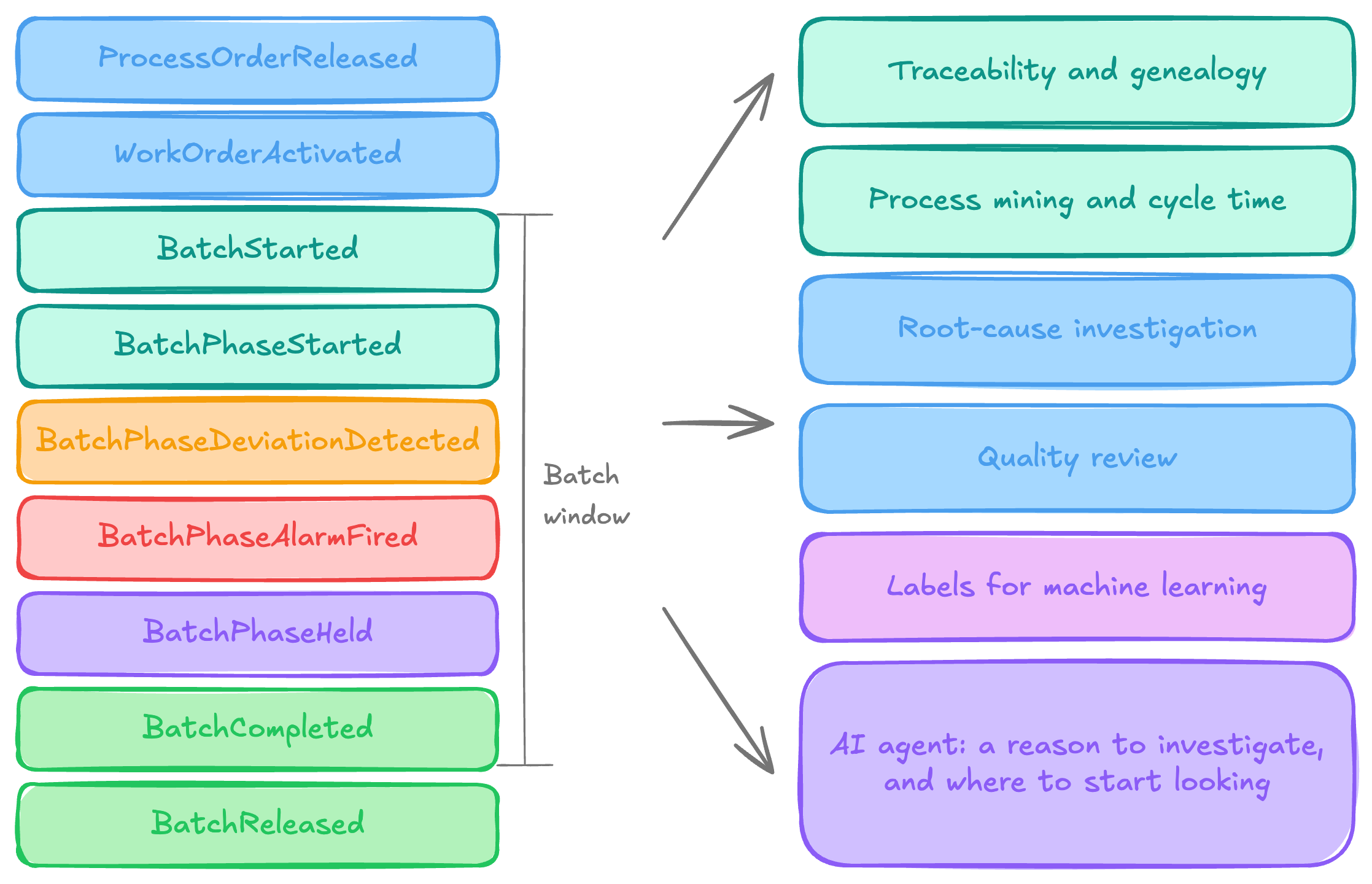
Once persisted, this history becomes useful for traceability, process mining, cycle-time analysis, root-cause investigation, quality review, and continuous improvement. Events also create natural analytical boundaries: BatchStarted and BatchCompleted define a Batch window, while BatchPhaseStarted and BatchPhaseCompleted define the period over which phase-specific process data can be analysed.
They can also provide useful labels for machine learning. If a BatchPhaseDeviationDetected event occurs at a known time, the process history preceding that event can be retrieved and labelled as conditions that preceded a deviation.
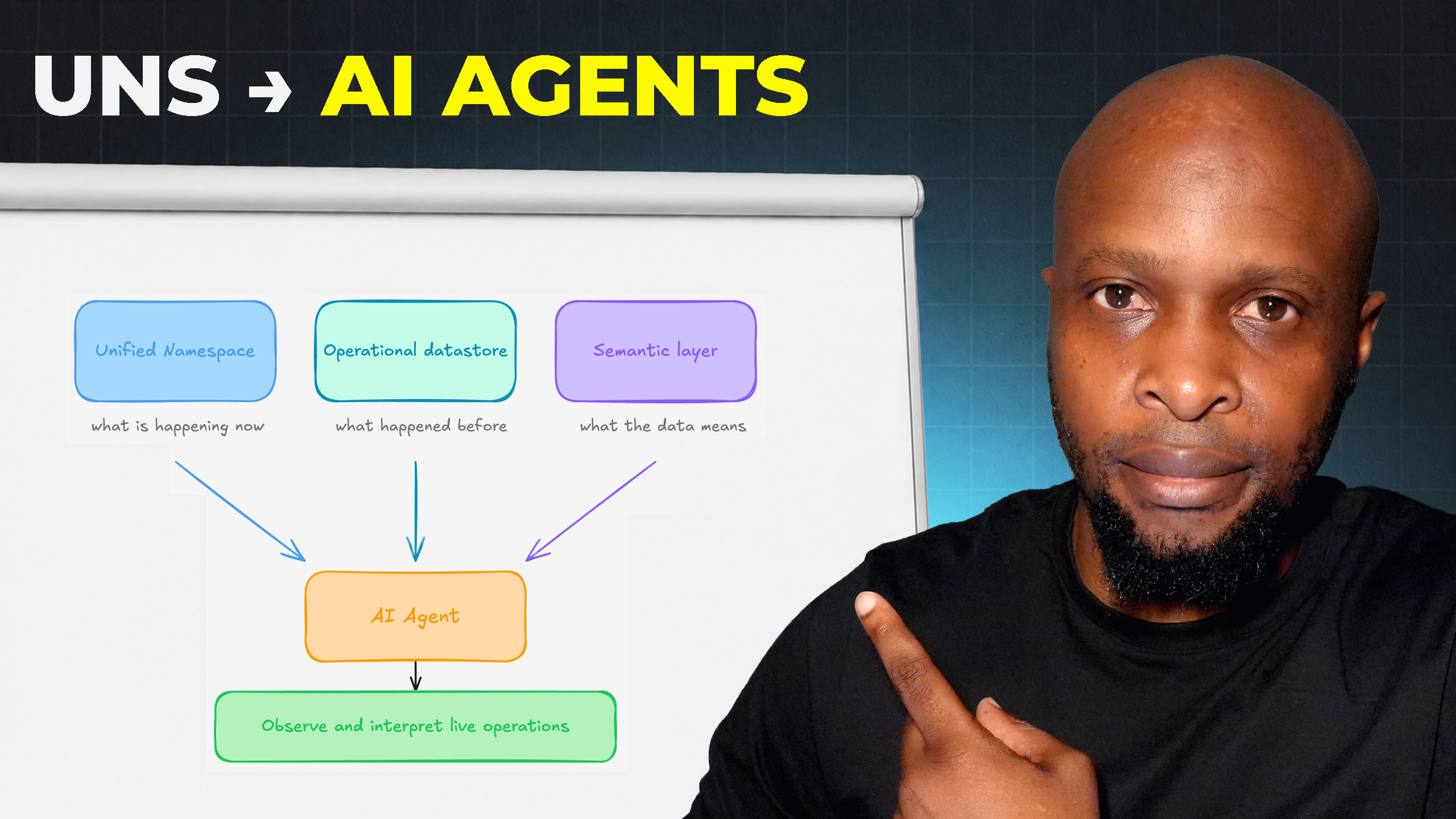
For AI agents, events provide something equally important: a reason to investigate. Rather than continuously scanning thousands of process values, an agent can react to a meaningful occurrence, identify the affected Batch or asset, retrieve relevant historical and semantic context, inspect related events, and begin from a clearly defined operational change.
The event does not need to contain every piece of information required for that investigation. It needs enough identity, provenance, correlation, and event-time context to tell the rest of the architecture that something meaningful happened and where to begin looking.
Get the Next Guide
New architecture guides, implementation tutorials and use-case blueprints, delivered as they’re published.
More guides
All guides →

The leading IIoT & AI educational platform for digital manufacturing teams